EchoSubs is best for small teams and creators who need to turn existing videos into clean, re-captionable, or localised versions without uploading footage. Typical workflows: localisation teams removing burned-in subtitles before adding new-language captions; agencies and in-house teams processing NDA-protected client video; course creators batch-cleaning dozens of lessons; and educators converting PPT/PDF slide decks into narrated MP4 lessons. The expected result is a subtitle-free or narrated video saved next to the original, processed entirely on your own Mac or Windows PC. It is not the right fit for one-off clips a free web tool can handle, real-time cloud API workflows, or live transcription.
TRAITEMENT DE CONTENU A HAUT DEBIT
Vidéo mondialeContenuLocalisation.
Un système de traitement de contenu conçu pour des workflows répétables et à haut débit. Il permet de nettoyer les sous-titres incrustés, de transformer des diapositives PPT ou PDF en vidéos narrées et de produire des versions multilingues tout en maintenant la précision des sous-titres à grande échelle grâce à Refine Skills.
✓ Flux de traitement de contenu conçus pour le passage à l’échelle✓ Compétences de raffinement avancé✓ Haut Débit

APRES
AVANT
What is EchoSubs?
A desktop AI app for subtitle removal, captions, and slide-to-video — all offline.
EchoSubs is a desktop AI application for macOS and Windows that removes hardcoded subtitles from videos using local AI inpainting, generates accurate captions in 60+ languages, and converts PPT/PDF presentations into narrated videos — all running 100% offline on your machine.
- Platforms
- macOS 12+, Windows 10+
- Processing
- 100% offline, no upload
- Pricing
- From $5.99/mo or $69 lifetime
- Trial
- Free with watermark
- Languages
- 6 UI / 60+ subtitle
- Licence
- One-time lifetime available
Who should use EchoSubs? Best for small teams and creators that need to turn existing videos into clean, localised, or narrated versions without uploading footage to a cloud service.
Use case fit: best for
- Localisation teams that need to remove burned-in subtitles and re-caption videos in 60+ languages without re-shooting or re-editing
- Agencies and in-house teams processing NDA-protected or client-confidential video that cannot be uploaded to cloud SaaS
- Creators and course publishers batch-cleaning dozens to hundreds of videos in one local queue
- Educators converting PPT/PDF slide decks into narrated MP4 lessons
- Organisations under GDPR or data-residency constraints that rule out cloud processing
Not ideal for
- One-off subtitle removal where a free online tool is sufficient
- Workflows that need a real-time cloud API — EchoSubs is a desktop app, not a SaaS endpoint
- Live transcription — EchoSubs is built for post-production
Security & Privacy
Your videos never leave your machine.
EchoSubs is a desktop application — not a SaaS. Every operation, from subtitle detection to AI inpainting to PPT-to-video rendering, executes on your local CPU/GPU. There is no cloud upload path at all, even as an opt-in. That makes EchoSubs the only realistic option for NDA-protected, client-confidential, or regulated video work.
100% offline processing
Every frame of inpainting, every audio transcription, every TTS render runs on your CPU/GPU. Internet is only used to validate your licence.
Zero cloud upload
Source files never leave your filesystem. There is no S3 bucket, no temp-upload endpoint, no opt-in cloud mode — by design.
No telemetry on content
EchoSubs does not log filenames, durations, frame contents, audio tracks, or transcripts. Anonymous app metrics (crash, version) can be disabled.
GDPR-friendly by architecture
Because videos and subtitles never traverse our servers, EchoSubs has no controller/processor role over your content. Self-contained workflow, no DPA needed.
Technical details: Licence activation uses RSA-2048; the macOS build is notarised and runs under Hardened Runtime; the Windows build is code-signed. Source code for the local processing pipeline can be reviewed under NDA for enterprise customers — contact us for a security questionnaire.
Alternatives & Comparison
How EchoSubs compares to Veed.io, CapCut, and GiliSoft.
A quick scan of where EchoSubs wins, where it ties, and where another tool may serve you better. We try to be honest about the trade-offs — there are workflows where a free online tool genuinely is the right call.
| Attribute | EchoSubs | Veed.io | CapCut | GiliSoft |
|---|---|---|---|---|
| Starting price | $5.99/mo or $69 one-time | Subscription only | Free + subscription | One-time licence |
| Platform / compatibility | macOS + Windows | Any browser | Desktop + mobile | Windows only |
| Setup effort | ~5-min install | No install | App install | App install |
| Runs 100% offline | ||||
| AI inpainting (no blur) | ||||
| Lossless passthrough encoding | ||||
| PPT/PDF → narrated video | ||||
| Batch (folder) processing | ||||
| One-time purchase option | ||||
| No watermark on free trial |
Pick EchoSubs if…
You handle NDA-protected, client-confidential, or regulated video, run batches of 10+ files at a time, or need PPT/PDF → narrated MP4 in the same tool.
Pick Veed.io or CapCut if…
You need to clean up one or two short videos a year, the content isn't sensitive, and you'd rather not install desktop software. Here EchoSubs loses on convenience — it needs a ~5-minute install and a licence, while Veed.io and CapCut run free in a browser and add a timeline editor, transitions, and social templates EchoSubs deliberately doesn't.
Pick GiliSoft if…
You're on Windows-only and already own a GiliSoft licence — quality is decent but it re-encodes every video, costing more time and quality than EchoSubs' lossless pipeline.
Where EchoSubs loses — honestly
EchoSubs is a subtitle-removal, inpainting, and narration engine, not a full video editor. For a single 30-second clip you'll never touch again, installing a desktop app and buying a licence is overkill — Veed.io or CapCut clean it in the browser for free. It has no timeline editor, transitions, or ready-made social templates like CapCut, and no browser access from a Chromebook or phone like Veed.io. It is Windows and macOS only, so Linux users are unsupported. GiliSoft matches its one-time pricing on Windows, but re-encodes every export, which costs more time and quality than EchoSubs' lossless passthrough. Choose EchoSubs when privacy, batch volume, and output quality matter more than in-browser convenience.
Integrations & Compatibility
Which tools, platforms, and file formats does EchoSubs work with?
EchoSubs works with MP4, MKV, MOV, AVI, WebM, and FLV video, SRT/VTT subtitle files, and PPT/PDF presentations on macOS and Windows. It does not currently support a cloud API, a command-line interface, Zapier or webhooks, Linux, or editing-suite plugins — the workflow is local file in, local file out, so your footage never passes through a third-party server.
Works with
- Video formats
- MP4, MKV, MOV, AVI, WebM, FLV
- Subtitle files
- SRT and VTT (import for translation or as a reference)
- Presentations
- PPT/PPTX and PDF → narrated MP4
- Operating systems
- macOS 12+ and Windows 10+
- GPU acceleration
- Apple Silicon (M1/M2/M3) and NVIDIA GPUs; CPU fallback
Does not currently support
- Cloud API
- No REST API or hosted endpoint — processing is local only
- Command line
- No command-line interface — jobs run from the desktop app
- No-code automation
- No Zapier, Make, or webhook integrations
- Platforms
- No Linux, browser, or mobile version
- Editing suites
- No plugin for Premiere Pro, Final Cut, or DaVinci Resolve — export the file and import it
Proof
Real videos, processed locally, on real hardware.
EchoSubs ships a working product, not a waitlist. Below are the only numbers we publish — we'd rather under-state and back the claim with the actual binary than oversell.
98.5%
Subtitle detection accuracy
Measured on the internal benchmark set of 200 mixed-language clips.
~2.3 min
Average per 1080p video
On Apple M2 / RTX 3060-class hardware; CPU-only is 3–4× slower.
10×
Faster than cloud tools
No upload, no queue, no re-encode — measured against Veed and Vmake on the same 5-minute 1080p clip.
Customer stories
We publish customer case studies only with written, on-the-record permission. If EchoSubs has saved your team meaningful hours and you'd be open to a short quote, please get in touch — we'd love to credit you here.
Onboarding & Setup
Onboarding: get your first cleaned video in under 5 minutes.
Setup takes about 5 minutes; it requires a macOS 12+ or Windows 10+ computer and a video file — no account, no cloud upload, no waiting in a queue. Your first result is a subtitle-free copy of your video saved next to the original. Here's the entire onboarding flow:
- 1
Download EchoSubs
macOS .dmg or Windows installer. No account required for the trial.
60 sec
- 2
Drag your video into the app
Drop a single file or an entire folder. Supports MP4, MKV, MOV, AVI, WebM, FLV, and more.
30 sec
- 3
Let AI suggest detection parameters
EchoSubs auto-detects the subtitle region, guesses the spoken language, and recommends an inpainting model. Accept the defaults or tweak any of them.
~5 sec, automatic
- 4
Click Remove (or Generate, or Convert)
Processing runs on your local GPU. A 5-minute 1080p video takes about 2–3 minutes on M2 / RTX 3060-class hardware.
3–5 min
Time to first result: ~5 minutes. You'll see the cleaned video appear in the same folder as the original. No account needed for the trial.
Frequently asked
The questions buyers ask before they commit.
Use-case fit, security, price, migration, integrations, onboarding time, trial limits, offline capability, hardware. Direct answers — no jargon, no upsell.
EchoSubs runs 100% offline on your local machine — videos are never uploaded to any server, including ours. There is no cloud processing mode, even as an opt-in. The app uses the internet only to validate your licence; subtitle detection, AI inpainting, transcription, and TTS all execute on your CPU/GPU. This makes EchoSubs safe for NDA-protected, client-confidential, and regulated workflows where cloud SaaS is not an option.
EchoSubs has three buying options: Pro at $5.99/month (monthly subscription), Biz at $79/month (team subscription), and a one-time Lifetime licence at $69 (no subscription, includes lifetime updates). A free trial is available with watermarked output for subtitle generation; subtitle removal and PPT/PDF-to-video require a paid licence.
There is no project file to migrate — EchoSubs works directly on your source video files. Drop your original MP4/MKV/MOV/AVI/WebM/FLV into the app and it processes them with the same AI workflow regardless of which tool you previously used. SRT or VTT caption files you already have can be loaded as a starting point for translation or as a reference for inpainting masks.
EchoSubs works with MP4, MKV, MOV, AVI, WebM, and FLV video, SRT and VTT subtitle files, and PPT/PDF presentations, on macOS 12+ and Windows 10+ with Apple Silicon or NVIDIA GPU acceleration (CPU fallback supported). It does not currently support a REST API, a command-line interface, Zapier, webhooks, Linux, browser or mobile use, or editing-suite plugins. EchoSubs is a desktop application: the workflow is local-file in, local-file out, because every cloud integration would require routing content through a third-party server, which contradicts the offline-only architecture.
Setup takes about five minutes; it requires a macOS 12+ or Windows 10+ computer and a video file, and no account is needed for the trial. The first result is a cleaned video saved next to the original. Step one: download the installer (~60 seconds). Step two: drag your video file into the app (~30 seconds). Step three: accept the AI-suggested detection parameters or tweak them (~5 seconds). Step four: click Remove and let the local GPU work (~3-5 minutes for a 5-minute 1080p clip). No account or sign-up is required to start the trial.
Yes. The subtitle generation feature runs in trial mode without a licence — the output carries a small watermark, useful for evaluating accuracy and language coverage before purchase. Subtitle removal and PPT/PDF-to-video features require a paid licence to run end-to-end. There is no time limit on the trial; you can keep evaluating the watermarked workflow as long as you want.
EchoSubs works fully offline once you have activated your licence. After the one-time online activation step, you can disconnect from the internet entirely and continue processing videos indefinitely — the AI inpainting models, transcription models, and TTS voices are all bundled with the app and run on your local hardware. Periodic licence re-validation happens silently in the background when the internet is available, but never blocks active processing.
EchoSubs runs on any macOS 12+ or Windows 10+ machine, but speed is GPU-bound. On Apple M1/M2/M3 or an NVIDIA RTX 3060-class or better GPU, a 5-minute 1080p video processes in about 2 to 3 minutes. CPU-only machines work too, but are 3 to 4 times slower for the AI inpainting step. There is no minimum RAM requirement beyond what the OS itself needs — the app streams frames rather than loading the whole video into memory.
Modules de Traitement Principaux
Quatre pipelines déterministes conçus pour le débit — automatiser ce qui ne nécessite pas de jugement humain.
View Suppression Sous-titres Incrustés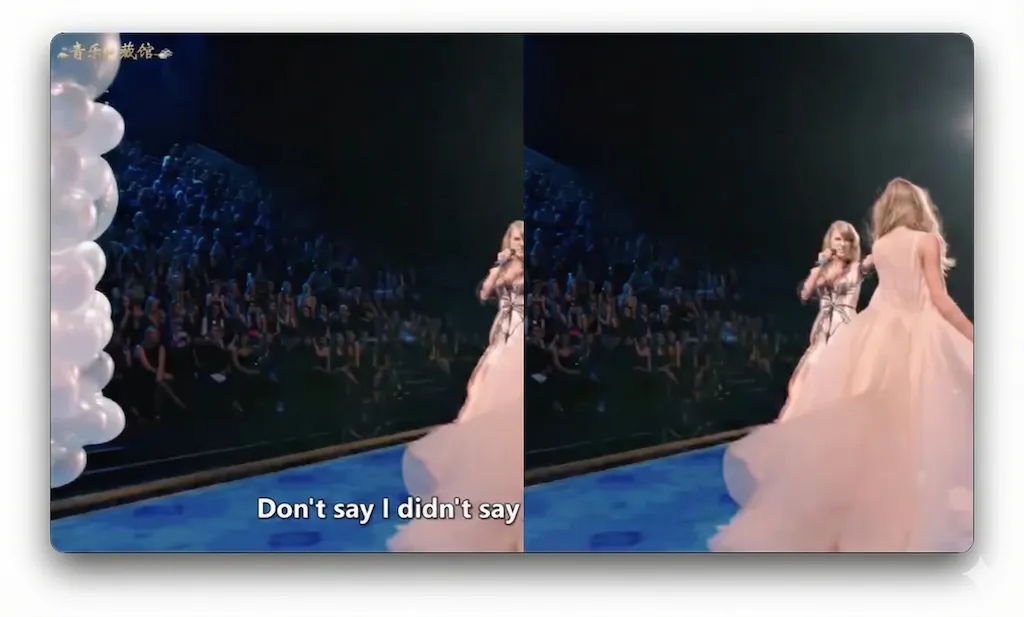
🛠️
Suppression Sous-titres Incrustés
Libérez les vidéos existantes contraintes par des sous-titres incrustés. Supprimez le texte intégré directement de l'image vidéo, produisant des séquences nettes prêtes pour le re-sous-titrage ou le re-doublage dans n'importe quelle langue.
View Présentation vers Vidéo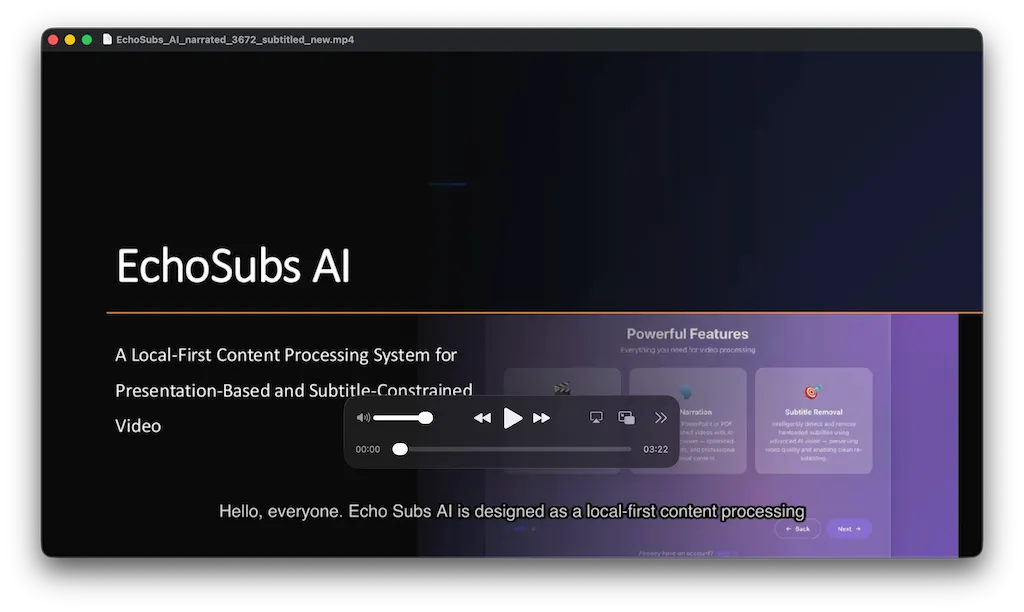
⚡
Présentation vers Vidéo
Traitez la conversion PPT et PDF comme un processus déterministe. Extrayez la structure, générez la narration et assemblez la sortie vidéo — idéal pour les cours, formations et communications standardisées.
View Compétences de raffinement avancé(Skills)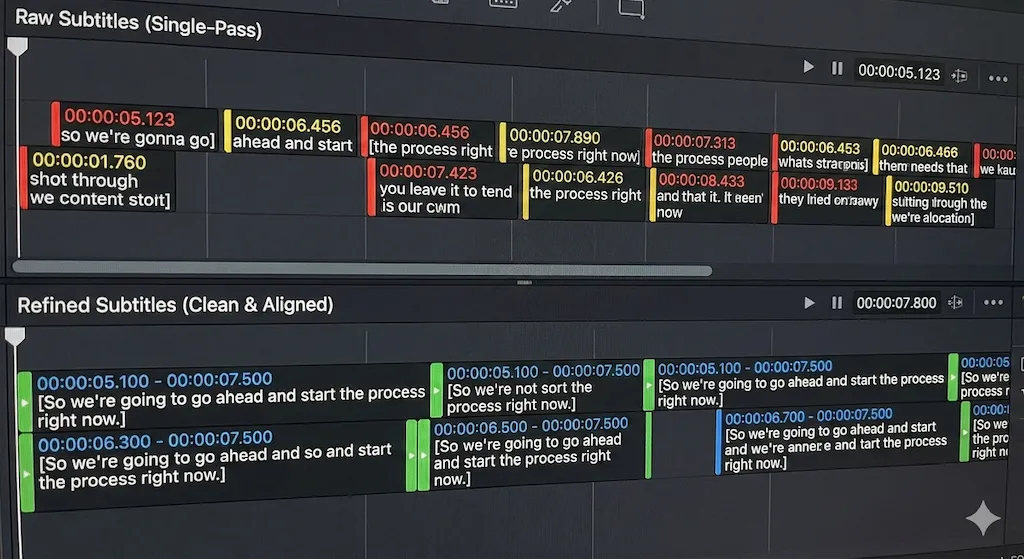
🌍
Compétences de raffinement avancé(Skills)
Au-delà de la transcription simple. Refine Skills applique un post-traitement structuré pour améliorer l'alignement temporel, les limites de phrases et la cohérence — maintenant la qualité des sous-titres sur le contenu long.
View Localisation Multilingue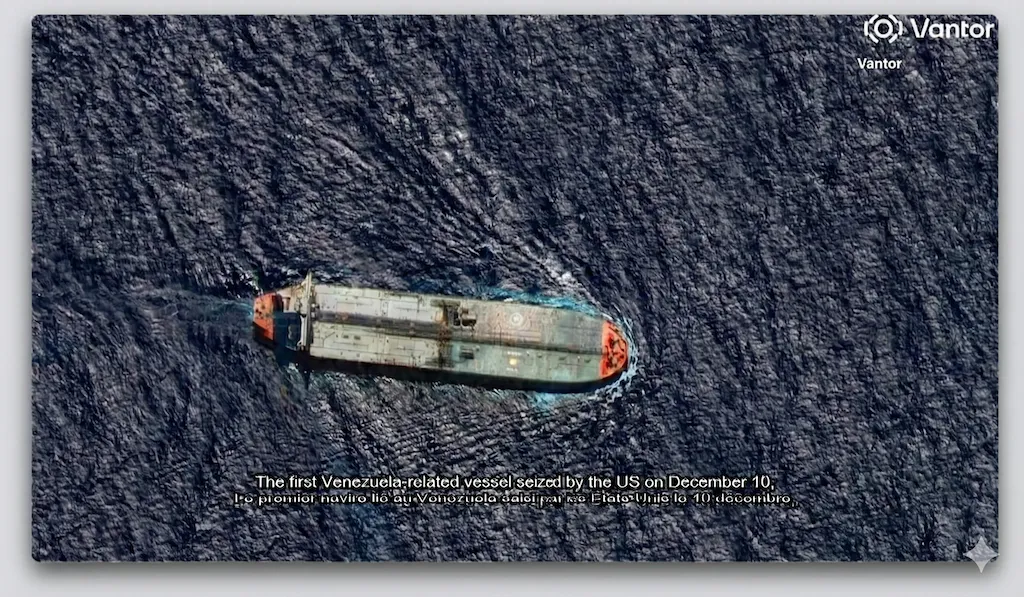
🎬
Localisation Multilingue
Produisez des versions linguistiques supplémentaires par configuration, pas par reconstruction. Combiné avec Refine Skills, la qualité des sous-titres reste stable à travers les langues et les longues durées.
Des formules pour chaque créateur
MensuelAnnuel (Économisez 29%)
Gratuit
$0/mois
- ✓ 30 minutes/mois de durée de sous-titres
- ✓ Thèmes et bibliothèque vocale basiques
- ✗ Exportation avec filigrane
- ✗ Pas de traduction ou amélioration AI
- ✗ Pas de traitement AI
- ✗ Pas de suppression de sous-titres incrustés
OFFRE À VIE
Standard
$69/à vie
- ✓ 5 heures/mois de sous-titres
- ✓ Thèmes et bibliothèque vocale basiques
- ✓ Aucun filigrane
- ✓ Suppression de sous-titres incrustés
- ✗ Pas de traduction ou amélioration AI
- ✗ Pas de traitement AI
LE PLUS POPULAIRE
Pro Creator
$49/an$169
Jusqu'au 31 déc. 2026
- ✓ 30 heures/mois de sous-titres
- ✓ Plus de thèmes & voix
- ✓ Aucun filigrane
- ✓ Suppression de sous-titres incrustés
- ✓ Traduction/amélioration AI incluse (3 heures)
- ✓ 3 heures/mois de traitement AI
Business
$669/an$948
- ✓ Durée de sous-titres illimitée
- ✓ Plus de thèmes & voix
- ✓ Aucun filigrane
- ✓ Accès complet aux fonctionnalités
- ✓ Traduction/amélioration AI (15 heures)
- ✓ 15 heures/mois de traitement AI
🪙 Crédits Tokens
Packs prépayés pour du temps de génération AI supplémentaire.
Mini
$9
2 h AI
Standard
$29
10 h AI
Agence
$99
50 heures d'IA et 20 heures de sous-titres vidéo
RETOURS CLIENTS
Pour les équipes qui doivent avancer plus vite sur la vidéo
Quelques retours de créateurs, d'équipes de formation et d'agences qui utilisent EchoSubs dans leur travail quotidien.
J'utilise surtout EchoSubs pour d'anciennes vidéos avec des sous-titres incrustés. Cela m'évite de refaire tout le montage, et le traitement local reste pratique même sur de longs fichiers.
Maya Chen
Créatrice de contenus pédagogiques
Nettoyage de sous-titres incrustés
Nous avions beaucoup de présentations internes qui restaient dans des dossiers. Maintenant, nous pouvons les transformer en vidéos narrées sans envoyer nos documents sur un autre site.
Daniel Brooks
Responsable learning operations
Workflow PPT vers vidéo hors ligne
Le plus utile pour nous, c'est le traitement par lots. On lance les vidéos clients le soir, puis le matin on vérifie les résultats et on reprend seulement les passages nécessaires.
Sofia Ramirez
Productrice localisation
Traitement de sous-titres par lots
NOTRE VISION
Traitement local-first
pour contenu mondial
Ce qui rend EchoSubs différent
01
Exécution Locale par Conception
Tout le traitement s'exécute localement sur votre machine. Pas de téléchargement cloud, pas de délais de file d'attente, pas de dépendance réseau. Le contrôle du contenu et la stabilité opérationnelle sont intégrés à l'architecture.
02
Refine Skills pour la Précision
Les sous-titres ne sont pas des sorties en une passe. Refine Skills applique un post-traitement structuré pour corriger la dérive temporelle, les limites de phrases et les erreurs de contexte — particulièrement critique pour le contenu long.
03
Débit, Pas Timelines
Pas un éditeur vidéo traditionnel. EchoSubs traite la conversion présentation-vidéo, la suppression de sous-titres et la localisation comme des pipelines structurés — complétant souvent des heures de vidéo en minutes.
04
Fiabilité Entreprise
Sortie déterministe et reproductible. Traitement accéléré GPU avec qualité constante entre les exécutions — conçu pour éducateurs, équipes médias et opérations internationales.
01
Exécution Locale par Conception
Tout le traitement s'exécute localement sur votre machine. Pas de téléchargement cloud, pas de délais de file d'attente, pas de dépendance réseau. Le contrôle du contenu et la stabilité opérationnelle sont intégrés à l'architecture.
02
Refine Skills pour la Précision
Les sous-titres ne sont pas des sorties en une passe. Refine Skills applique un post-traitement structuré pour corriger la dérive temporelle, les limites de phrases et les erreurs de contexte — particulièrement critique pour le contenu long.
03
Débit, Pas Timelines
Pas un éditeur vidéo traditionnel. EchoSubs traite la conversion présentation-vidéo, la suppression de sous-titres et la localisation comme des pipelines structurés — complétant souvent des heures de vidéo en minutes.
04
Fiabilité Entreprise
Sortie déterministe et reproductible. Traitement accéléré GPU avec qualité constante entre les exécutions — conçu pour éducateurs, équipes médias et opérations internationales.
Nous recrutons des partenaires
Nous recherchons des revendeurs internationaux, des studios de contenu, des distributeurs et des partenaires d’intégration pour étendre EchoSubs sur de nouveaux marchés.
Si votre activité concerne les créateurs, l’éducation ou les entreprises — collaborons ensemble.
Contactez-nous
Intéressé par nos offres entreprise, partenariats ou opportunités d’investissement ?
contact@echosubs.com
Seattle, Washington, États-Unis
© 2024–2026 Cnnex Limited Company. All rights reserved.