EchoSubs is best for small teams and creators who need to turn existing videos into clean, re-captionable, or localised versions without uploading footage. Typical workflows: localisation teams removing burned-in subtitles before adding new-language captions; agencies and in-house teams processing NDA-protected client video; course creators batch-cleaning dozens of lessons; and educators converting PPT/PDF slide decks into narrated MP4 lessons. The expected result is a subtitle-free or narrated video saved next to the original, processed entirely on your own Mac or Windows PC. It is not the right fit for one-off clips a free web tool can handle, real-time cloud API workflows, or live transcription.
高吞吐内容处理
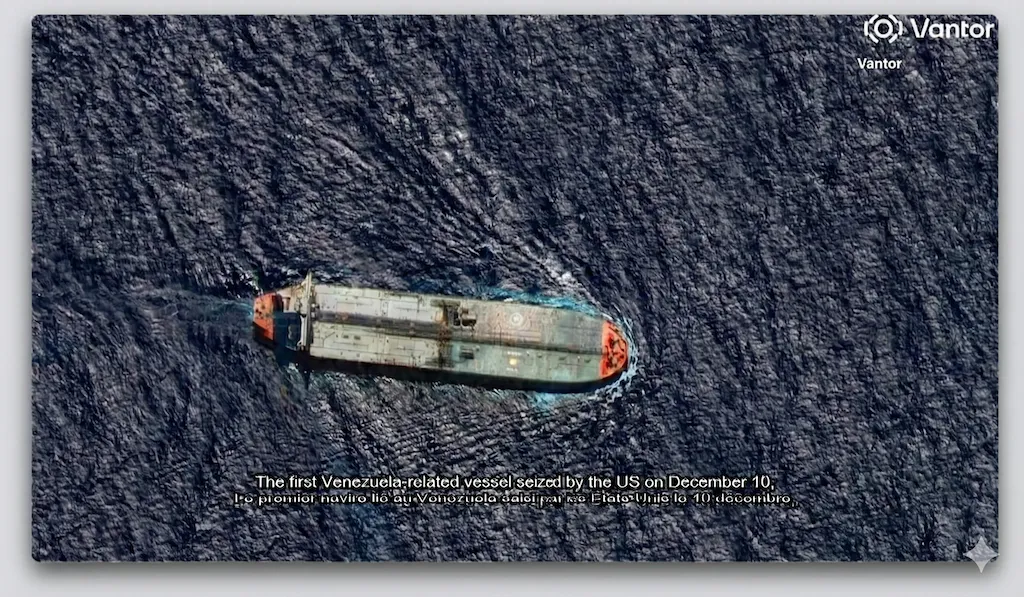
全球视频内容本地化
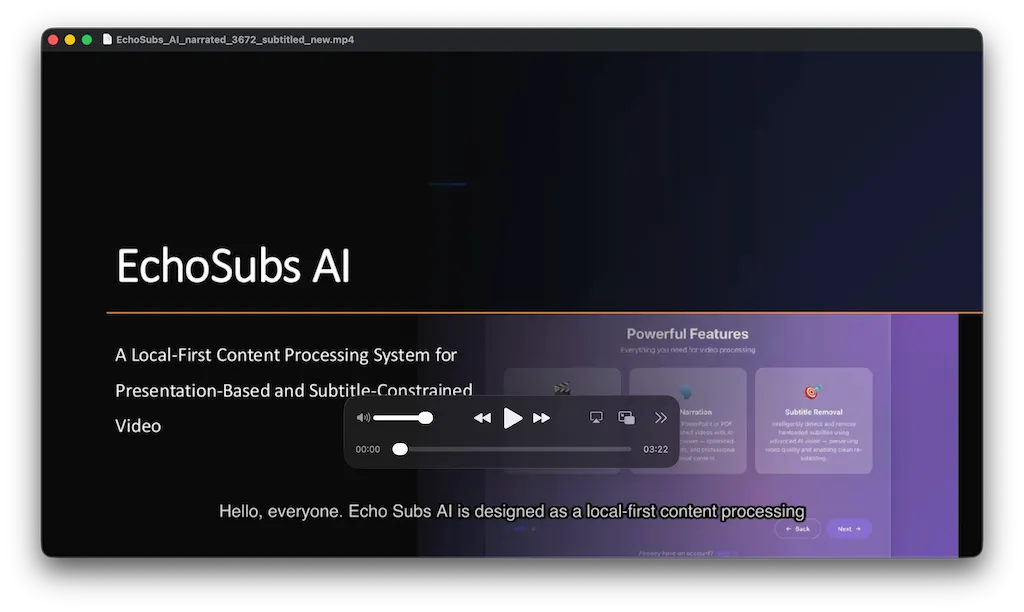
一套面向可重复、高吞吐工作流设计的内容处理系统。可清理视频中的硬编码字幕,将 PPT 或 PDF 幻灯片转换为配音视频,并通过 Refine Skills 在规模化处理下保持字幕的准确性与一致性。
✓ 可规模化运行的内容处理流程✓ 精细化字幕校正能力✓ 高吞吐量

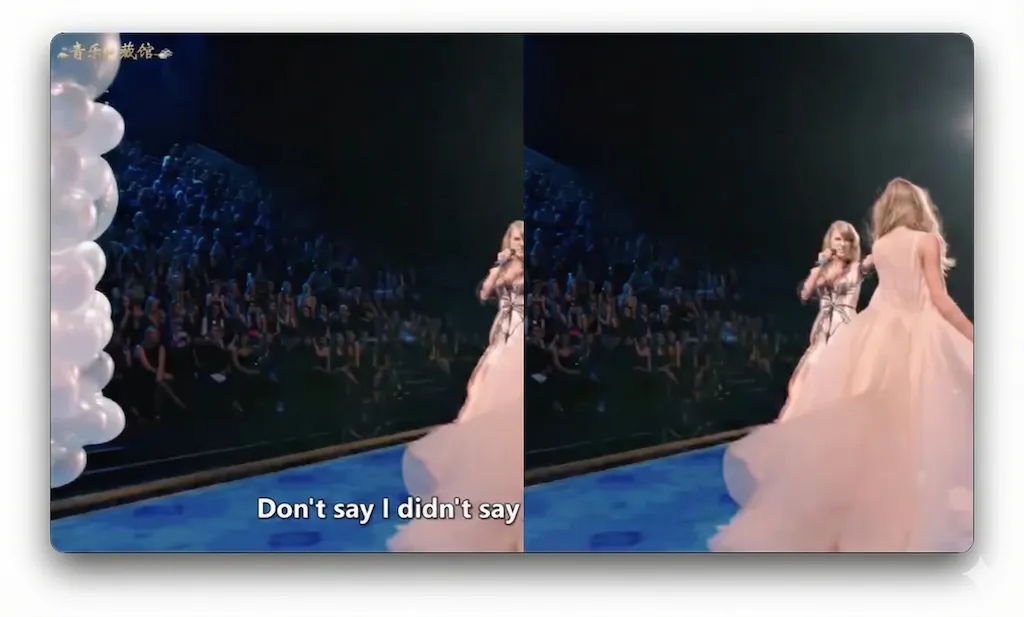
去字幕后
去字幕前
What is EchoSubs?
A desktop AI app for subtitle removal, captions, and slide-to-video — all offline.
EchoSubs is a desktop AI application for macOS and Windows that removes hardcoded subtitles from videos using local AI inpainting, generates accurate captions in 60+ languages, and converts PPT/PDF presentations into narrated videos — all running 100% offline on your machine.
- Platforms
- macOS 12+, Windows 10+
- Processing
- 100% offline, no upload
- Pricing
- From $5.99/mo or $69 lifetime
- Trial
- Free with watermark
- Languages
- 6 UI / 60+ subtitle
- Licence
- One-time lifetime available
Who should use EchoSubs? Best for small teams and creators that need to turn existing videos into clean, localised, or narrated versions without uploading footage to a cloud service.
Use case fit: best for
- Localisation teams that need to remove burned-in subtitles and re-caption videos in 60+ languages without re-shooting or re-editing
- Agencies and in-house teams processing NDA-protected or client-confidential video that cannot be uploaded to cloud SaaS
- Creators and course publishers batch-cleaning dozens to hundreds of videos in one local queue
- Educators converting PPT/PDF slide decks into narrated MP4 lessons
- Organisations under GDPR or data-residency constraints that rule out cloud processing
Not ideal for
- One-off subtitle removal where a free online tool is sufficient
- Workflows that need a real-time cloud API — EchoSubs is a desktop app, not a SaaS endpoint
- Live transcription — EchoSubs is built for post-production
Security & Privacy
Your videos never leave your machine.
EchoSubs is a desktop application — not a SaaS. Every operation, from subtitle detection to AI inpainting to PPT-to-video rendering, executes on your local CPU/GPU. There is no cloud upload path at all, even as an opt-in. That makes EchoSubs the only realistic option for NDA-protected, client-confidential, or regulated video work.
100% offline processing
Every frame of inpainting, every audio transcription, every TTS render runs on your CPU/GPU. Internet is only used to validate your licence.
Zero cloud upload
Source files never leave your filesystem. There is no S3 bucket, no temp-upload endpoint, no opt-in cloud mode — by design.
No telemetry on content
EchoSubs does not log filenames, durations, frame contents, audio tracks, or transcripts. Anonymous app metrics (crash, version) can be disabled.
GDPR-friendly by architecture
Because videos and subtitles never traverse our servers, EchoSubs has no controller/processor role over your content. Self-contained workflow, no DPA needed.
Technical details: Licence activation uses RSA-2048; the macOS build is notarised and runs under Hardened Runtime; the Windows build is code-signed. Source code for the local processing pipeline can be reviewed under NDA for enterprise customers — contact us for a security questionnaire.
Alternatives & Comparison
How EchoSubs compares to Veed.io, CapCut, and GiliSoft.
A quick scan of where EchoSubs wins, where it ties, and where another tool may serve you better. We try to be honest about the trade-offs — there are workflows where a free online tool genuinely is the right call.
| Attribute | EchoSubs | Veed.io | CapCut | GiliSoft |
|---|---|---|---|---|
| Starting price | $5.99/mo or $69 one-time | Subscription only | Free + subscription | One-time licence |
| Platform / compatibility | macOS + Windows | Any browser | Desktop + mobile | Windows only |
| Setup effort | ~5-min install | No install | App install | App install |
| Runs 100% offline | ||||
| AI inpainting (no blur) | ||||
| Lossless passthrough encoding | ||||
| PPT/PDF → narrated video | ||||
| Batch (folder) processing | ||||
| One-time purchase option | ||||
| No watermark on free trial |
Pick EchoSubs if…
You handle NDA-protected, client-confidential, or regulated video, run batches of 10+ files at a time, or need PPT/PDF → narrated MP4 in the same tool.
Pick Veed.io or CapCut if…
You need to clean up one or two short videos a year, the content isn't sensitive, and you'd rather not install desktop software. Here EchoSubs loses on convenience — it needs a ~5-minute install and a licence, while Veed.io and CapCut run free in a browser and add a timeline editor, transitions, and social templates EchoSubs deliberately doesn't.
Pick GiliSoft if…
You're on Windows-only and already own a GiliSoft licence — quality is decent but it re-encodes every video, costing more time and quality than EchoSubs' lossless pipeline.
Where EchoSubs loses — honestly
EchoSubs is a subtitle-removal, inpainting, and narration engine, not a full video editor. For a single 30-second clip you'll never touch again, installing a desktop app and buying a licence is overkill — Veed.io or CapCut clean it in the browser for free. It has no timeline editor, transitions, or ready-made social templates like CapCut, and no browser access from a Chromebook or phone like Veed.io. It is Windows and macOS only, so Linux users are unsupported. GiliSoft matches its one-time pricing on Windows, but re-encodes every export, which costs more time and quality than EchoSubs' lossless passthrough. Choose EchoSubs when privacy, batch volume, and output quality matter more than in-browser convenience.
Integrations & Compatibility
Which tools, platforms, and file formats does EchoSubs work with?
EchoSubs works with MP4, MKV, MOV, AVI, WebM, and FLV video, SRT/VTT subtitle files, and PPT/PDF presentations on macOS and Windows. It does not currently support a cloud API, a command-line interface, Zapier or webhooks, Linux, or editing-suite plugins — the workflow is local file in, local file out, so your footage never passes through a third-party server.
Works with
- Video formats
- MP4, MKV, MOV, AVI, WebM, FLV
- Subtitle files
- SRT and VTT (import for translation or as a reference)
- Presentations
- PPT/PPTX and PDF → narrated MP4
- Operating systems
- macOS 12+ and Windows 10+
- GPU acceleration
- Apple Silicon (M1/M2/M3) and NVIDIA GPUs; CPU fallback
Does not currently support
- Cloud API
- No REST API or hosted endpoint — processing is local only
- Command line
- No command-line interface — jobs run from the desktop app
- No-code automation
- No Zapier, Make, or webhook integrations
- Platforms
- No Linux, browser, or mobile version
- Editing suites
- No plugin for Premiere Pro, Final Cut, or DaVinci Resolve — export the file and import it
Proof
Real videos, processed locally, on real hardware.
EchoSubs ships a working product, not a waitlist. Below are the only numbers we publish — we'd rather under-state and back the claim with the actual binary than oversell.
98.5%
Subtitle detection accuracy
Measured on the internal benchmark set of 200 mixed-language clips.
~2.3 min
Average per 1080p video
On Apple M2 / RTX 3060-class hardware; CPU-only is 3–4× slower.
10×
Faster than cloud tools
No upload, no queue, no re-encode — measured against Veed and Vmake on the same 5-minute 1080p clip.
Customer stories
We publish customer case studies only with written, on-the-record permission. If EchoSubs has saved your team meaningful hours and you'd be open to a short quote, please get in touch — we'd love to credit you here.
Onboarding & Setup
Onboarding: get your first cleaned video in under 5 minutes.
Setup takes about 5 minutes; it requires a macOS 12+ or Windows 10+ computer and a video file — no account, no cloud upload, no waiting in a queue. Your first result is a subtitle-free copy of your video saved next to the original. Here's the entire onboarding flow:
- 1
Download EchoSubs
macOS .dmg or Windows installer. No account required for the trial.
60 sec
- 2
Drag your video into the app
Drop a single file or an entire folder. Supports MP4, MKV, MOV, AVI, WebM, FLV, and more.
30 sec
- 3
Let AI suggest detection parameters
EchoSubs auto-detects the subtitle region, guesses the spoken language, and recommends an inpainting model. Accept the defaults or tweak any of them.
~5 sec, automatic
- 4
Click Remove (or Generate, or Convert)
Processing runs on your local GPU. A 5-minute 1080p video takes about 2–3 minutes on M2 / RTX 3060-class hardware.
3–5 min
Time to first result: ~5 minutes. You'll see the cleaned video appear in the same folder as the original. No account needed for the trial.
Frequently asked
The questions buyers ask before they commit.
Use-case fit, security, price, migration, integrations, onboarding time, trial limits, offline capability, hardware. Direct answers — no jargon, no upsell.
EchoSubs runs 100% offline on your local machine — videos are never uploaded to any server, including ours. There is no cloud processing mode, even as an opt-in. The app uses the internet only to validate your licence; subtitle detection, AI inpainting, transcription, and TTS all execute on your CPU/GPU. This makes EchoSubs safe for NDA-protected, client-confidential, and regulated workflows where cloud SaaS is not an option.
EchoSubs has three buying options: Pro at $5.99/month (monthly subscription), Biz at $79/month (team subscription), and a one-time Lifetime licence at $69 (no subscription, includes lifetime updates). A free trial is available with watermarked output for subtitle generation; subtitle removal and PPT/PDF-to-video require a paid licence.
There is no project file to migrate — EchoSubs works directly on your source video files. Drop your original MP4/MKV/MOV/AVI/WebM/FLV into the app and it processes them with the same AI workflow regardless of which tool you previously used. SRT or VTT caption files you already have can be loaded as a starting point for translation or as a reference for inpainting masks.
EchoSubs works with MP4, MKV, MOV, AVI, WebM, and FLV video, SRT and VTT subtitle files, and PPT/PDF presentations, on macOS 12+ and Windows 10+ with Apple Silicon or NVIDIA GPU acceleration (CPU fallback supported). It does not currently support a REST API, a command-line interface, Zapier, webhooks, Linux, browser or mobile use, or editing-suite plugins. EchoSubs is a desktop application: the workflow is local-file in, local-file out, because every cloud integration would require routing content through a third-party server, which contradicts the offline-only architecture.
Setup takes about five minutes; it requires a macOS 12+ or Windows 10+ computer and a video file, and no account is needed for the trial. The first result is a cleaned video saved next to the original. Step one: download the installer (~60 seconds). Step two: drag your video file into the app (~30 seconds). Step three: accept the AI-suggested detection parameters or tweak them (~5 seconds). Step four: click Remove and let the local GPU work (~3-5 minutes for a 5-minute 1080p clip). No account or sign-up is required to start the trial.
Yes. The subtitle generation feature runs in trial mode without a licence — the output carries a small watermark, useful for evaluating accuracy and language coverage before purchase. Subtitle removal and PPT/PDF-to-video features require a paid licence to run end-to-end. There is no time limit on the trial; you can keep evaluating the watermarked workflow as long as you want.
EchoSubs works fully offline once you have activated your licence. After the one-time online activation step, you can disconnect from the internet entirely and continue processing videos indefinitely — the AI inpainting models, transcription models, and TTS voices are all bundled with the app and run on your local hardware. Periodic licence re-validation happens silently in the background when the internet is available, but never blocks active processing.
EchoSubs runs on any macOS 12+ or Windows 10+ machine, but speed is GPU-bound. On Apple M1/M2/M3 or an NVIDIA RTX 3060-class or better GPU, a 5-minute 1080p video processes in about 2 to 3 minutes. CPU-only machines work too, but are 3 to 4 times slower for the AI inpainting step. There is no minimum RAM requirement beyond what the OS itself needs — the app streams frames rather than loading the whole video into memory.
View 精细化字幕校正能力(Skills)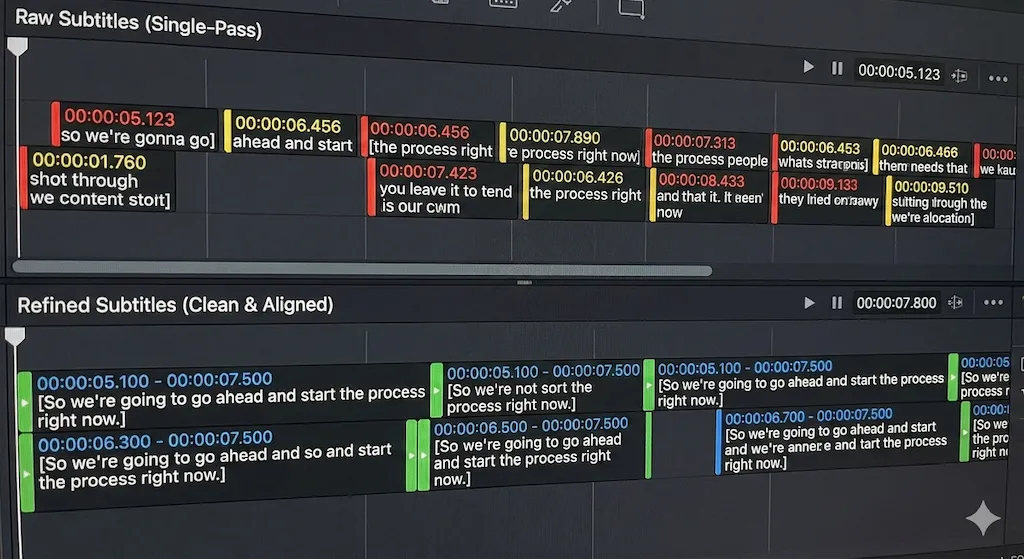
🌍
精细化字幕校正能力(Skills)
超越单次转录。Refine Skills 应用结构化后处理来改善时间对齐、句子边界和一致性 —— 在长视频内容中保持字幕质量。
为每位创作者量身打造的方案
月付年付(节省 29%)
免费版
$0/月
- ✓ 每月 30 分钟字幕时长
- ✓ 基础背景主题与语音库
- ✗ 导出带水印
- ✗ 无 AI 翻译或字幕优化
- ✗ 无 AI 处理
- ✗ 无硬字幕去除功能
终身特惠
标准版
$69/终身
- ✓ 每月 5 小时字幕时长
- ✓ 基础背景主题与语音库
- ✓ 无水印导出
- ✓ 硬字幕去除
- ✗ 无 AI 翻译或字幕优化
- ✗ 无 AI 处理
最受欢迎
专业创作者版
$49/年$169
优惠截至 2026-12-31
- ✓ 每月 30 小时字幕时长
- ✓ 更多背景主题与语音库
- ✓ 无水印导出
- ✓ 硬字幕去除
- ✓ 包含 3 小时的 AI 翻译/字幕优化
- ✓ 每月 3 小时 AI 处理
企业版
$669/年$948
- ✓ 无限字幕时长
- ✓ 更多背景主题与语音库
- ✓ 无水印导出
- ✓ 全部功能解锁
- ✓ 包含 15 小时 AI 翻译/字幕优化
- ✓ 每月 15 小时 AI 处理
🪙 Token 点数包
按量付费的 AI 处理时长包。可为你的方案扩展额外 AI 生成时间。
迷你包
$9
2 小时 AI
标准包
$29
10 小时 AI
机构包
$99
50 小时 AI & 20 小时视频字幕
客户反馈
给需要更快完成视频工作的团队使用
以下反馈来自日常处理课程、培训材料和客户视频的创作者与团队。
我主要用 EchoSubs 处理已经带硬字幕的旧视频。以前要重新剪一遍,现在可以先清理画面,再继续做新的字幕版本。
Maya Chen
YouTube 教学创作者
课程片段硬字幕清理
我们有很多内部培训 PPT,以前一直堆在文件夹里。现在可以在桌面端转成配音视频,不需要把资料上传到其他网站。
Daniel Brooks
学习运营经理
离线 PPT 转视频流程
最明显的变化是批量处理。晚上把客户视频排进队列,第二天早上检查结果,只把时间花在需要人工处理的片段上。
Sofia Ramirez
本地化制作人
批量字幕处理
我们的愿景
本地优先处理
服务全球内容
EchoSubs 的独特之处
01
本地执行架构
所有处理都在本地机器上运行。无需云端上传、无排队延迟、无网络依赖。内容控制和运营稳定性内置于架构中。
02
Refine Skills 精准优化
字幕不是一次性输出。Refine Skills 应用结构化后处理来修复时间漂移、句子边界和上下文错误 —— 对长视频尤为关键。
03
吞吐量优先,非时间线编辑
不是传统视频编辑器。EchoSubs 将演示文稿转视频、字幕去除和本地化作为结构化流水线处理 —— 数小时视频常在几分钟内完成。
04
企业级可靠性
确定性、可重复的输出。GPU 加速处理,跨运行保持一致质量 —— 专为教育工作者、媒体团队和国际运营打造。
01
本地执行架构
所有处理都在本地机器上运行。无需云端上传、无排队延迟、无网络依赖。内容控制和运营稳定性内置于架构中。
02
Refine Skills 精准优化
字幕不是一次性输出。Refine Skills 应用结构化后处理来修复时间漂移、句子边界和上下文错误 —— 对长视频尤为关键。
03
吞吐量优先,非时间线编辑
不是传统视频编辑器。EchoSubs 将演示文稿转视频、字幕去除和本地化作为结构化流水线处理 —— 数小时视频常在几分钟内完成。
04
企业级可靠性
确定性、可重复的输出。GPU 加速处理,跨运行保持一致质量 —— 专为教育工作者、媒体团队和国际运营打造。
我们正在招募合作伙伴
我们正在寻找全球经销商、分销渠道、内容工作室以及集成合作伙伴,共同拓展 EchoSubs 的全球市场。
如果你的业务服务创作者、教育机构或企业 —— 欢迎与我们合作。
联系我们
对企业方案、合作伙伴关系或投资有兴趣?
contact@echosubs.com
美国华盛顿州西雅图
© 2024–2026 Cnnex Limited Company. All rights reserved.