EchoSubs is best for small teams and creators who need to turn existing videos into clean, re-captionable, or localised versions without uploading footage. Typical workflows: localisation teams removing burned-in subtitles before adding new-language captions; agencies and in-house teams processing NDA-protected client video; course creators batch-cleaning dozens of lessons; and educators converting PPT/PDF slide decks into narrated MP4 lessons. The expected result is a subtitle-free or narrated video saved next to the original, processed entirely on your own Mac or Windows PC. It is not the right fit for one-off clips a free web tool can handle, real-time cloud API workflows, or live transcription.
ハイスループット・コンテンツ処理
グローバル動画コンテンツローカライゼーション
再現性と高い処理量を前提に設計されたコンテンツ処理システムです。映像に焼き込まれた字幕のクリーンアップ、PPT/PDF スライドのナレーション動画化、多言語出力を、Refine Skills により字幕精度を維持したまま実現します。
✓ スケーラブルなコンテンツ処理パイプライン✓ 精度向上のためのリファイン機能✓ 高スループット

処理後
処理前
What is EchoSubs?
A desktop AI app for subtitle removal, captions, and slide-to-video — all offline.
EchoSubs is a desktop AI application for macOS and Windows that removes hardcoded subtitles from videos using local AI inpainting, generates accurate captions in 60+ languages, and converts PPT/PDF presentations into narrated videos — all running 100% offline on your machine.
- Platforms
- macOS 12+, Windows 10+
- Processing
- 100% offline, no upload
- Pricing
- From $5.99/mo or $69 lifetime
- Trial
- Free with watermark
- Languages
- 6 UI / 60+ subtitle
- Licence
- One-time lifetime available
Who should use EchoSubs? Best for small teams and creators that need to turn existing videos into clean, localised, or narrated versions without uploading footage to a cloud service.
Use case fit: best for
- Localisation teams that need to remove burned-in subtitles and re-caption videos in 60+ languages without re-shooting or re-editing
- Agencies and in-house teams processing NDA-protected or client-confidential video that cannot be uploaded to cloud SaaS
- Creators and course publishers batch-cleaning dozens to hundreds of videos in one local queue
- Educators converting PPT/PDF slide decks into narrated MP4 lessons
- Organisations under GDPR or data-residency constraints that rule out cloud processing
Not ideal for
- One-off subtitle removal where a free online tool is sufficient
- Workflows that need a real-time cloud API — EchoSubs is a desktop app, not a SaaS endpoint
- Live transcription — EchoSubs is built for post-production
Security & Privacy
Your videos never leave your machine.
EchoSubs is a desktop application — not a SaaS. Every operation, from subtitle detection to AI inpainting to PPT-to-video rendering, executes on your local CPU/GPU. There is no cloud upload path at all, even as an opt-in. That makes EchoSubs the only realistic option for NDA-protected, client-confidential, or regulated video work.
100% offline processing
Every frame of inpainting, every audio transcription, every TTS render runs on your CPU/GPU. Internet is only used to validate your licence.
Zero cloud upload
Source files never leave your filesystem. There is no S3 bucket, no temp-upload endpoint, no opt-in cloud mode — by design.
No telemetry on content
EchoSubs does not log filenames, durations, frame contents, audio tracks, or transcripts. Anonymous app metrics (crash, version) can be disabled.
GDPR-friendly by architecture
Because videos and subtitles never traverse our servers, EchoSubs has no controller/processor role over your content. Self-contained workflow, no DPA needed.
Technical details: Licence activation uses RSA-2048; the macOS build is notarised and runs under Hardened Runtime; the Windows build is code-signed. Source code for the local processing pipeline can be reviewed under NDA for enterprise customers — contact us for a security questionnaire.
Alternatives & Comparison
How EchoSubs compares to Veed.io, CapCut, and GiliSoft.
A quick scan of where EchoSubs wins, where it ties, and where another tool may serve you better. We try to be honest about the trade-offs — there are workflows where a free online tool genuinely is the right call.
| Attribute | EchoSubs | Veed.io | CapCut | GiliSoft |
|---|---|---|---|---|
| Starting price | $5.99/mo or $69 one-time | Subscription only | Free + subscription | One-time licence |
| Platform / compatibility | macOS + Windows | Any browser | Desktop + mobile | Windows only |
| Setup effort | ~5-min install | No install | App install | App install |
| Runs 100% offline | ||||
| AI inpainting (no blur) | ||||
| Lossless passthrough encoding | ||||
| PPT/PDF → narrated video | ||||
| Batch (folder) processing | ||||
| One-time purchase option | ||||
| No watermark on free trial |
Pick EchoSubs if…
You handle NDA-protected, client-confidential, or regulated video, run batches of 10+ files at a time, or need PPT/PDF → narrated MP4 in the same tool.
Pick Veed.io or CapCut if…
You need to clean up one or two short videos a year, the content isn't sensitive, and you'd rather not install desktop software. Here EchoSubs loses on convenience — it needs a ~5-minute install and a licence, while Veed.io and CapCut run free in a browser and add a timeline editor, transitions, and social templates EchoSubs deliberately doesn't.
Pick GiliSoft if…
You're on Windows-only and already own a GiliSoft licence — quality is decent but it re-encodes every video, costing more time and quality than EchoSubs' lossless pipeline.
Where EchoSubs loses — honestly
EchoSubs is a subtitle-removal, inpainting, and narration engine, not a full video editor. For a single 30-second clip you'll never touch again, installing a desktop app and buying a licence is overkill — Veed.io or CapCut clean it in the browser for free. It has no timeline editor, transitions, or ready-made social templates like CapCut, and no browser access from a Chromebook or phone like Veed.io. It is Windows and macOS only, so Linux users are unsupported. GiliSoft matches its one-time pricing on Windows, but re-encodes every export, which costs more time and quality than EchoSubs' lossless passthrough. Choose EchoSubs when privacy, batch volume, and output quality matter more than in-browser convenience.
Integrations & Compatibility
Which tools, platforms, and file formats does EchoSubs work with?
EchoSubs works with MP4, MKV, MOV, AVI, WebM, and FLV video, SRT/VTT subtitle files, and PPT/PDF presentations on macOS and Windows. It does not currently support a cloud API, a command-line interface, Zapier or webhooks, Linux, or editing-suite plugins — the workflow is local file in, local file out, so your footage never passes through a third-party server.
Works with
- Video formats
- MP4, MKV, MOV, AVI, WebM, FLV
- Subtitle files
- SRT and VTT (import for translation or as a reference)
- Presentations
- PPT/PPTX and PDF → narrated MP4
- Operating systems
- macOS 12+ and Windows 10+
- GPU acceleration
- Apple Silicon (M1/M2/M3) and NVIDIA GPUs; CPU fallback
Does not currently support
- Cloud API
- No REST API or hosted endpoint — processing is local only
- Command line
- No command-line interface — jobs run from the desktop app
- No-code automation
- No Zapier, Make, or webhook integrations
- Platforms
- No Linux, browser, or mobile version
- Editing suites
- No plugin for Premiere Pro, Final Cut, or DaVinci Resolve — export the file and import it
Proof
Real videos, processed locally, on real hardware.
EchoSubs ships a working product, not a waitlist. Below are the only numbers we publish — we'd rather under-state and back the claim with the actual binary than oversell.
98.5%
Subtitle detection accuracy
Measured on the internal benchmark set of 200 mixed-language clips.
~2.3 min
Average per 1080p video
On Apple M2 / RTX 3060-class hardware; CPU-only is 3–4× slower.
10×
Faster than cloud tools
No upload, no queue, no re-encode — measured against Veed and Vmake on the same 5-minute 1080p clip.
Customer stories
We publish customer case studies only with written, on-the-record permission. If EchoSubs has saved your team meaningful hours and you'd be open to a short quote, please get in touch — we'd love to credit you here.
Onboarding & Setup
Onboarding: get your first cleaned video in under 5 minutes.
Setup takes about 5 minutes; it requires a macOS 12+ or Windows 10+ computer and a video file — no account, no cloud upload, no waiting in a queue. Your first result is a subtitle-free copy of your video saved next to the original. Here's the entire onboarding flow:
- 1
Download EchoSubs
macOS .dmg or Windows installer. No account required for the trial.
60 sec
- 2
Drag your video into the app
Drop a single file or an entire folder. Supports MP4, MKV, MOV, AVI, WebM, FLV, and more.
30 sec
- 3
Let AI suggest detection parameters
EchoSubs auto-detects the subtitle region, guesses the spoken language, and recommends an inpainting model. Accept the defaults or tweak any of them.
~5 sec, automatic
- 4
Click Remove (or Generate, or Convert)
Processing runs on your local GPU. A 5-minute 1080p video takes about 2–3 minutes on M2 / RTX 3060-class hardware.
3–5 min
Time to first result: ~5 minutes. You'll see the cleaned video appear in the same folder as the original. No account needed for the trial.
Frequently asked
The questions buyers ask before they commit.
Use-case fit, security, price, migration, integrations, onboarding time, trial limits, offline capability, hardware. Direct answers — no jargon, no upsell.
EchoSubs runs 100% offline on your local machine — videos are never uploaded to any server, including ours. There is no cloud processing mode, even as an opt-in. The app uses the internet only to validate your licence; subtitle detection, AI inpainting, transcription, and TTS all execute on your CPU/GPU. This makes EchoSubs safe for NDA-protected, client-confidential, and regulated workflows where cloud SaaS is not an option.
EchoSubs has three buying options: Pro at $5.99/month (monthly subscription), Biz at $79/month (team subscription), and a one-time Lifetime licence at $69 (no subscription, includes lifetime updates). A free trial is available with watermarked output for subtitle generation; subtitle removal and PPT/PDF-to-video require a paid licence.
There is no project file to migrate — EchoSubs works directly on your source video files. Drop your original MP4/MKV/MOV/AVI/WebM/FLV into the app and it processes them with the same AI workflow regardless of which tool you previously used. SRT or VTT caption files you already have can be loaded as a starting point for translation or as a reference for inpainting masks.
EchoSubs works with MP4, MKV, MOV, AVI, WebM, and FLV video, SRT and VTT subtitle files, and PPT/PDF presentations, on macOS 12+ and Windows 10+ with Apple Silicon or NVIDIA GPU acceleration (CPU fallback supported). It does not currently support a REST API, a command-line interface, Zapier, webhooks, Linux, browser or mobile use, or editing-suite plugins. EchoSubs is a desktop application: the workflow is local-file in, local-file out, because every cloud integration would require routing content through a third-party server, which contradicts the offline-only architecture.
Setup takes about five minutes; it requires a macOS 12+ or Windows 10+ computer and a video file, and no account is needed for the trial. The first result is a cleaned video saved next to the original. Step one: download the installer (~60 seconds). Step two: drag your video file into the app (~30 seconds). Step three: accept the AI-suggested detection parameters or tweak them (~5 seconds). Step four: click Remove and let the local GPU work (~3-5 minutes for a 5-minute 1080p clip). No account or sign-up is required to start the trial.
Yes. The subtitle generation feature runs in trial mode without a licence — the output carries a small watermark, useful for evaluating accuracy and language coverage before purchase. Subtitle removal and PPT/PDF-to-video features require a paid licence to run end-to-end. There is no time limit on the trial; you can keep evaluating the watermarked workflow as long as you want.
EchoSubs works fully offline once you have activated your licence. After the one-time online activation step, you can disconnect from the internet entirely and continue processing videos indefinitely — the AI inpainting models, transcription models, and TTS voices are all bundled with the app and run on your local hardware. Periodic licence re-validation happens silently in the background when the internet is available, but never blocks active processing.
EchoSubs runs on any macOS 12+ or Windows 10+ machine, but speed is GPU-bound. On Apple M1/M2/M3 or an NVIDIA RTX 3060-class or better GPU, a 5-minute 1080p video processes in about 2 to 3 minutes. CPU-only machines work too, but are 3 to 4 times slower for the AI inpainting step. There is no minimum RAM requirement beyond what the OS itself needs — the app streams frames rather than loading the whole video into memory.
View 焼き付け字幕の除去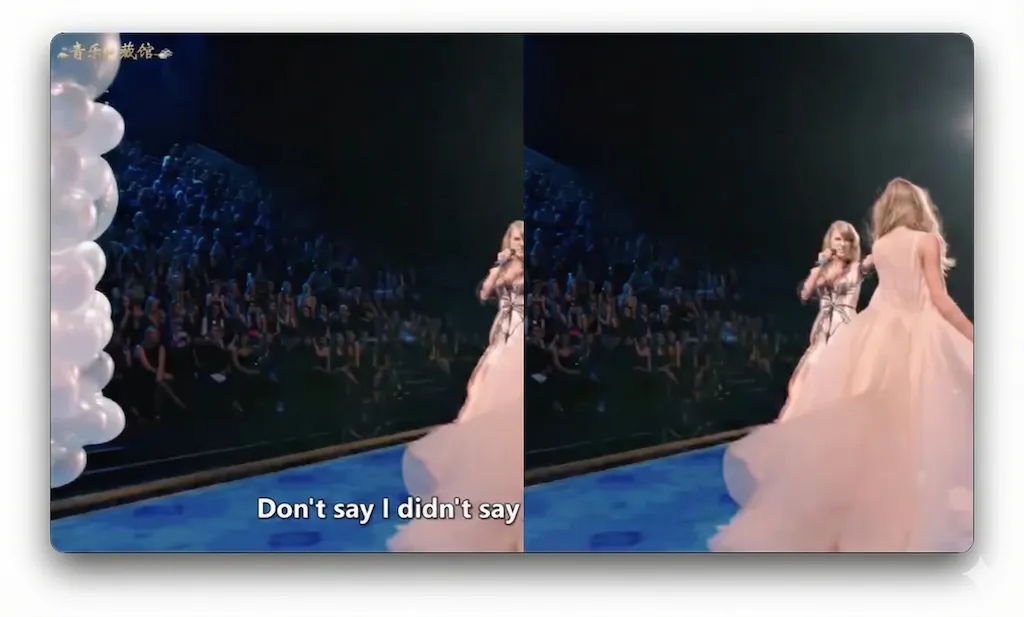
🛠️
焼き付け字幕の除去
ハードコードされた字幕で制約された既存動画を解放。原版を復元し、その後の再翻訳や再スタイリングを可能にします。OCRとインペインティングを1ステップで処理、一貫して出力を生成します。
View プレゼンから動画へ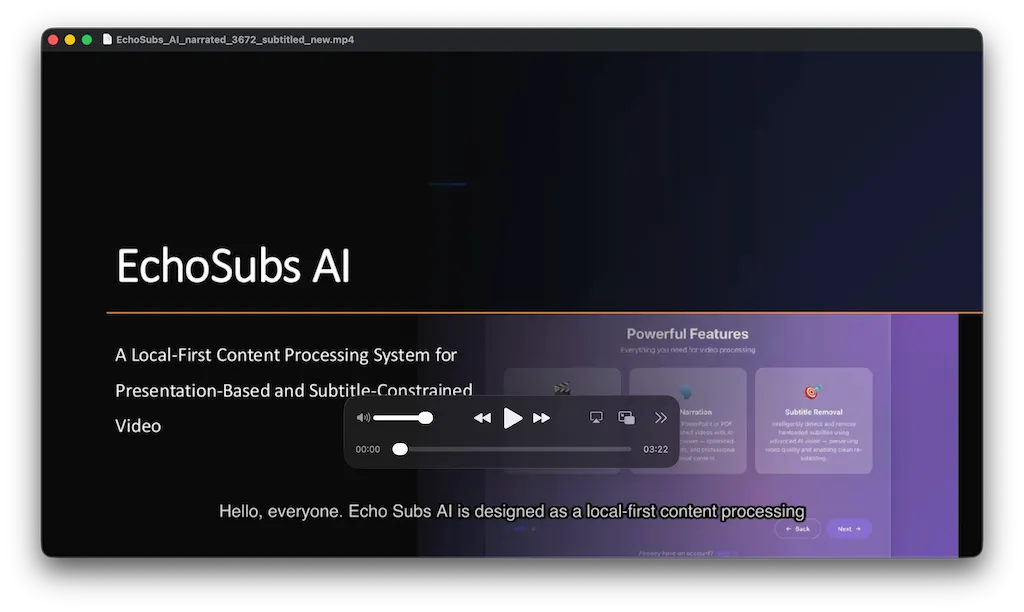
⚡
プレゼンから動画へ
PPTとPDFの変換を決定論的プロセスとして扱います。スライドからAIナレーション付き動画を生成 — フォーマットとテンポは入力によって決まり、手動の微調整は不要です。
View 精度向上のためのリファイン機能(Skills)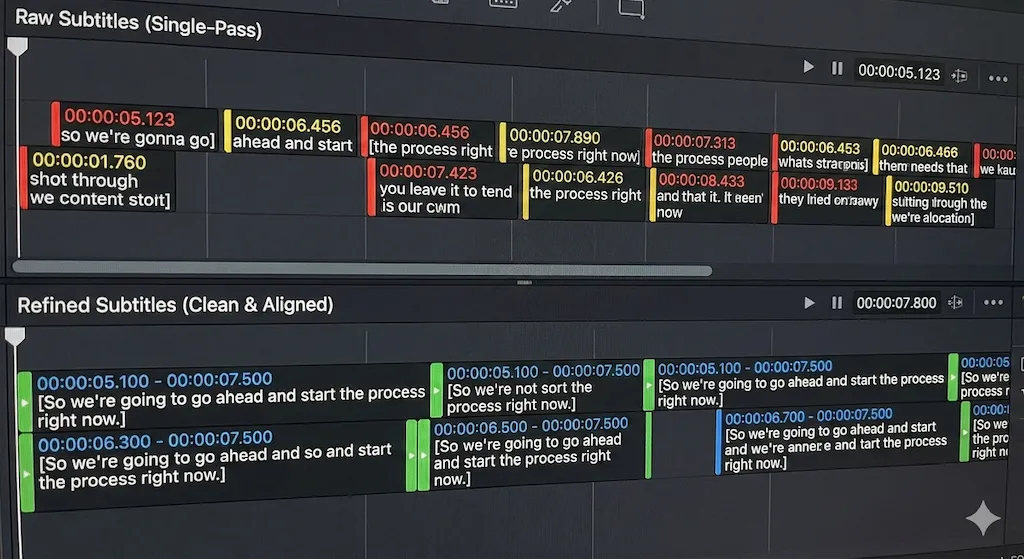
🌍
精度向上のためのリファイン機能(Skills)
単一パス転写を超えて。Refine Skillsは専門用語ライブラリ、フォーマットルール、コンテキストヒントを適用し、技術的・ブランド固有のコンテンツ全体で一貫した精度を確保します。
View 多言語ローカライゼーション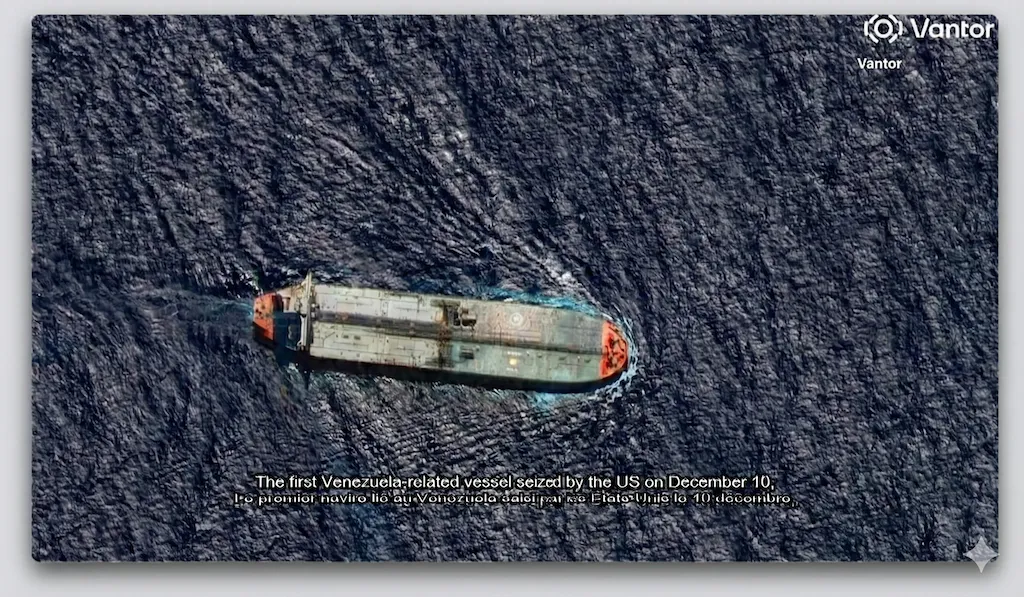
🎬
多言語ローカライゼーション
翻訳、タイミング調整、字幕焼き込みの設定で追加言語バージョンを作成。各出力は同じパイプラインに従い、ローカライゼーションを再現可能なワークフローにします。
料金プラン
月額年額(20%オフ) 29%)
無料
$0永久無料
- ✓ 無制限のオフライン処理
- ✓ ローカル Whisper 転写
- ✗ SRT / TXT エクスポート
- ✗ 基本波形エディター
- ✗ コミュニティサポート
- ✗ —
生涯プラン
永久ライセンス
$69一括払い
- ✓ 無料版の全機能
- ✓ 字幕焼き込みエクスポート
- ✓ 高度な波形編集
- ✓ 優先メールサポート
- ✗ 永久ローカルライセンス
- ✗ アップデート1年間無料
人気
Pro
$49/年$169
2026年12月31日まで
- ✓ 永久ライセンスの全機能
- ✓ AI Refine(クラウド)
- ✓ 多言語翻訳
- ✓ TTS音声合成
- ✓ 50,000 トークン/月
- ✓ 追加トークン購入可能
ビジネス
$669/年—
- ✓ Pro の全機能
- ✓ チーム管理ダッシュボード
- ✓ カスタムトークンパッケージ
- ✓ API アクセス
- ✓ 専任アカウントマネージャー
- ✓ 優先サポートとSLA
🪙 トークンパッケージ
Pro および Business サブスクリプションでは、クラウドAI機能にトークンを使用します。毎月のクォータを超えた場合は追加パッケージを購入できます。
ミニ
$9
AI 2 時間
スタンダード
$29
AI 10 時間
エージェンシー
$99
AI 50 時間
お客様の声
動画作業をもっと早く進めたいチームに
EchoSubs を日々の編集作業で使っているクリエイター、研修チーム、制作会社からの声です。
焼き付け字幕が入った古い動画の整理に使っています。編集を一から作り直さずに済みますし、長いファイルでもローカル処理なので扱いやすいです。
Maya Chen
YouTube 教育系クリエイター
講座動画の焼き付け字幕クリーンアップ
社内研修用のPPTが長い間フォルダに残ったままでした。今はデスクトップ上でナレーション付き動画にでき、社内資料を外部サイトにアップロードせずに済みます。
Daniel Brooks
ラーニング運用マネージャー
オフラインPPT動画化ワークフロー
一番助かっているのはバッチ処理です。夜にクライアント動画をキューに入れて、朝に結果を確認し、手作業が必要な部分だけに時間を使えます。
Sofia Ramirez
ローカライゼーションプロデューサー
字幕処理のバッチワーク
ビジョン
ローカルファースト処理で
グローバルコンテンツを支える
EchoSubs が異なる理由
01
設計によるローカル実行
すべての処理がローカルマシン上で実行されます。クラウドアップロード不要、キュー待ち不要、ネットワーク依存なし。コンテンツ管理と運用の安定性がアーキテクチャに組み込まれています。
02
精度のための Refine Skills
字幕は単発出力ではありません。Refine Skills は構造化された後処理を適用し、タイミングのずれ、文の境界、文脈エラーを修正 — 長時間コンテンツには特に重要です。
03
スループット重視、タイムラインではなく
従来の動画編集ソフトではありません。EchoSubs はプレゼンテーションから動画への変換、字幕除去、ローカライゼーションを構造化されたパイプラインとして処理 — 数時間の動画を数分で完了することも。
04
エンタープライズ級の信頼性
決定論的で再現可能な出力。GPU 加速処理により実行間で一貫した品質を実現 — 教育者、メディアチーム、国際事業向けに設計されています。
01
設計によるローカル実行
すべての処理がローカルマシン上で実行されます。クラウドアップロード不要、キュー待ち不要、ネットワーク依存なし。コンテンツ管理と運用の安定性がアーキテクチャに組み込まれています。
02
精度のための Refine Skills
字幕は単発出力ではありません。Refine Skills は構造化された後処理を適用し、タイミングのずれ、文の境界、文脈エラーを修正 — 長時間コンテンツには特に重要です。
03
スループット重視、タイムラインではなく
従来の動画編集ソフトではありません。EchoSubs はプレゼンテーションから動画への変換、字幕除去、ローカライゼーションを構造化されたパイプラインとして処理 — 数時間の動画を数分で完了することも。
04
エンタープライズ級の信頼性
決定論的で再現可能な出力。GPU 加速処理により実行間で一貫した品質を実現 — 教育者、メディアチーム、国際事業向けに設計されています。
パートナーを募集しています
EchoSubs を世界へ広げるため、販売代理店、コンテンツスタジオ、流通パートナー、統合パートナーを募集しています。
クリエイター、教育、企業向けビジネスを展開している方 — ぜひご連絡ください。
お問い合わせ
企業向けプラン、パートナーシップ、投資についてご興味がありますか?
contact@echosubs.com
シアトル(ワシントン州、米国)
© 2024–2026 Cnnex Limited Company. All rights reserved.